01Operational Full Stack Platform

OPERATIONAL PRODUCT · FULL STACK · INFRASTRUCTURE

787 AirClub — Airport Transfer Operations Platform

A web/PWA platform for airport-transfer operations where passengers, drivers, and the operations team work through connected role-specific interfaces and one controlled order lifecycle.

Project summary

Product
Airport transfer operations platform
Surfaces
Passenger · Driver · Dispatcher · Admin
Responsibility
Product, Full Stack, data, integrations, delivery
Case boundary
Public-safe · no production data

Business problem

Connect self-service and operational control

Airport-transfer operations require more than an order form: the product needs separate permissions, lifecycle states, assignment rules, pricing references, notifications, and controlled exception handling.

Project requirements
  • Keep the passenger flow calm and free of internal operations terminology.
  • Show drivers only eligible available orders and their own work.
  • Give dispatch and administration clear exception visibility and reference-data controls.
  • Preserve lifecycle, finance snapshot, and audit integrity.

Solution

What I built

A web/PWA platform for airport-transfer operations where passengers, drivers, and the operations team work through connected role-specific interfaces and one controlled order lifecycle.

Responsibility

Product, Full Stack, and release engineering

My responsibility spans product workflows, full stack implementation, and evidence-led delivery.

  1. 01

    Product model

    Roles, user flows, truthful states, and MVP boundaries.

  2. 02

    Backend & data

    APIs, business rules, Prisma models, migrations, and audit.

  3. 03

    Role interfaces

    Passenger, driver, operations, and admin UX.

  4. 04

    Release engineering

    Tests, builds, smoke checks, deployment, and recovery evidence.

15 · Public interfaces

Role-specific product interfaces

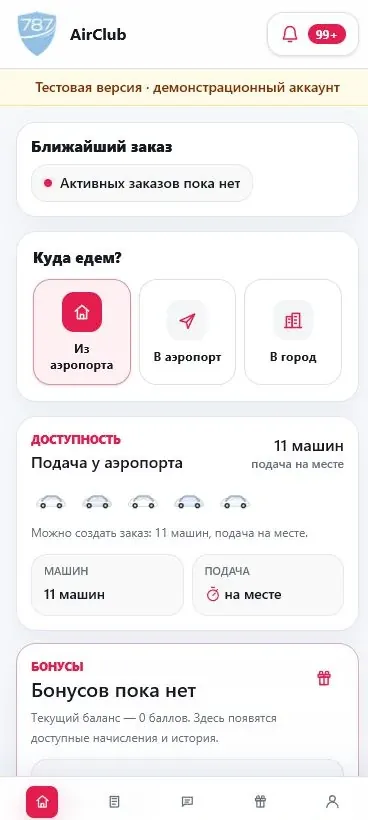
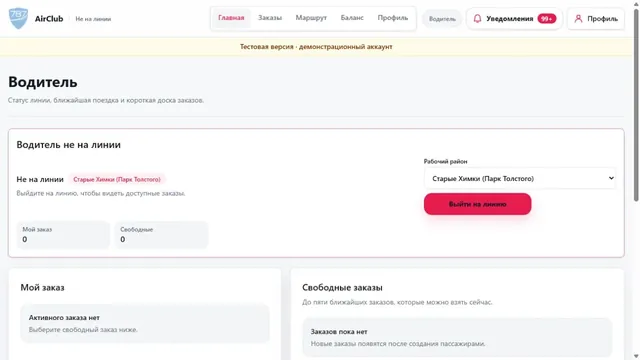
Screens from an explicitly marked demo environment. All values are synthetic; no production data was used.

04 · Privacy reviewed

Branded sign-in with no entered phone number or one-time code.
Passenger dashboard in an explicitly marked demo account; values are synthetic.
Driver empty state from the demo environment without passengers or rides.
Only the demo account aggregate overview; order identifiers and dates are excluded.

User roles

Four separated product surfaces

Select a node · connections & practice

SYSTEM OVERVIEW

Separate roles. One shared lifecycle.

Passengers, drivers and operations work with the same order through separate interfaces and permissions.

Hover or focus to preview. Click to keep the selection. Click again or press Escape to clear.Tap a node to explore its connections. Tap it again to clear the selection.

No selection

Order without internal operations detail

Passenger flow

Passenger

  1. 01

    Direction

    To or from the airport

  2. 02

    Address and point

    Passenger-readable stops

  3. 03

    Time and party

    Date, time, passengers

  4. 04

    Create order

    Server validation and lifecycle

  5. 05

    Status

    Waiting, assigned, in progress

  6. 06

    Completion

    History and notifications

Availability, assignment, and ride progress

Driver flow

Driver

  1. 01

    Availability

    Working state and zone

  2. 02

    Order board

    Eligible scope only

  3. 03

    Accept

    Assignment validation

  4. 04

    Pickup

    Allowed transition

  5. 05

    In progress

    Operational state

  6. 06

    Complete

    Finance snapshot and audit

Operations, reference data, and exceptions

Normal work remains self-service. Dispatcher and administration surfaces provide visibility, configuration, and controlled exception handling.

  • problem and waiting order overview
  • driver assignment and release context
  • roles and access
  • zones and airport points
  • tariff rules
  • finance, reports, and audit trail

Controlled state transitions

User-facing states are derived from server order state, driver assignment, and audit events; the UI does not invent decorative lifecycle states.

Ride lifecycle

  1. 01

    Created

    Validated order

  2. 02

    Waiting for driver

    Available to eligible drivers

  3. 03

    Driver found

    Assignment confirmed

  4. 04

    Pickup

    Driver approaches

  5. 05

    In progress

    Active route

  6. 06

    Completed

    Final state and accounting

Key decisions

Separate roles, shared rules

  • Separate interfaces for passengers, drivers and operations.
  • Statuses follow the server-side lifecycle, not decorative UI states.
  • Financial snapshots and an append-only ledger preserve trip history.

Infrastructure

Delivery and maintainable operations

Production delivery separates frontend, backend, and data responsibilities, verifies release identity, and maintains reproducible recovery steps.

  • Next.js frontend and NestJS backend
  • PostgreSQL/Prisma migrations
  • Docker/Linux runtime
  • HTTPS/reverse proxy boundary
  • CI gates and immutable build identity
  • live/ready health checks
  • monitoring, backups, and rollback documentation

Five connected platform layers

Separated role interfaces share application contracts, a relational model, and bounded integration adapters.

  1. 01

    Experience

    Passenger, driver, dispatcher, and admin interfaces.

    • Next.js
    • React
    • responsive PWA
    • role-aware states
  2. 02

    Application

    Orders, rides, roles, assignments, and transitions.

    • NestJS
    • REST API
    • RBAC
    • validation
    • Socket.IO
  3. 03

    Data

    Relational models, migrations, audit, and finance ledger.

    • PostgreSQL
    • Prisma
    • migrations
    • transactions
    • indexes
  4. 04

    Integrations

    Notifications, Telegram gateway, and provider boundaries.

    • webhooks
    • signed callbacks
    • realtime
    • provider adapters
  5. 05

    Delivery

    Build gates, release identity, and operational runbooks.

    • Docker
    • Linux
    • CI/CD
    • health checks
    • backups

Internal zones, clear passenger routes

Passengers choose an address and airport point. Zones remain internal units for matching, positioning, and tariff logic.

  • canonical zones and airport points
  • direction and passenger count
  • server-side price/quote contracts
  • admin-managed tariff rules
  • no unsupported prices in the UI
  • controlled manual correction workflow

Ride snapshots and an append-only ledger

The finance layer uses accepted ride snapshots and an append-only ledger instead of recalculating historical values in the interface.

  • fare, service commission, and driver income snapshots
  • personal/group/default commission source
  • reason-required manual adjustments
  • driver commission accrual/payment tracking
  • read-only reports and CSV
  • no acquiring, bank payout, or tax subsystem

Public boundary

What intentionally remains private

The public case explains the product without exposing operational data or sensitive configuration.

  • synthetic/demo screenshots only
  • no real passengers, drivers, or rides
  • no balances, invite/referral codes, or vehicle identifiers
  • no IPs, domains, credentials, logs, or secrets
  • no unverified metrics or fleet claims
  • security and deployment detail is generalized